Chip rate: turn chips into real dollars
PokerNow counts in chips. You settle up in dollars. Chip rate is the exchange rate between the two — set it right and every total in PXF comes out in real money. Set it wrong and every number is off by the same multiple.
What it is
One number: how many dollars one chip is worth. PXF reads the chip counts straight from PokerNow; the chip rate is the only thing it needs to turn those chips into the money you actually owe.
When you'd set it
Once per game — the first time you load it. If a payout total ever looks 10× too big or too small, the chip rate is almost always the reason.
The one idea
Picture the same winning night — +1,000 chips — under two house rules. The chips don't change. The rate does, and that's what decides whether you collect $1,000 or $10.
1 chip = $1
+1,000 chips
= +$1,000
The default for most home games.
$100 buy-in = 10,000 chips
+1,000 chips
= +$10
A "deep-stack" rate — 1 chip = 1¢.
Same chips, 100× difference in dollars. That's why PXF asks once, up front — so it never guesses, and your settlement is always in the currency you actually play for.
Where you set it
In the free payout calculator
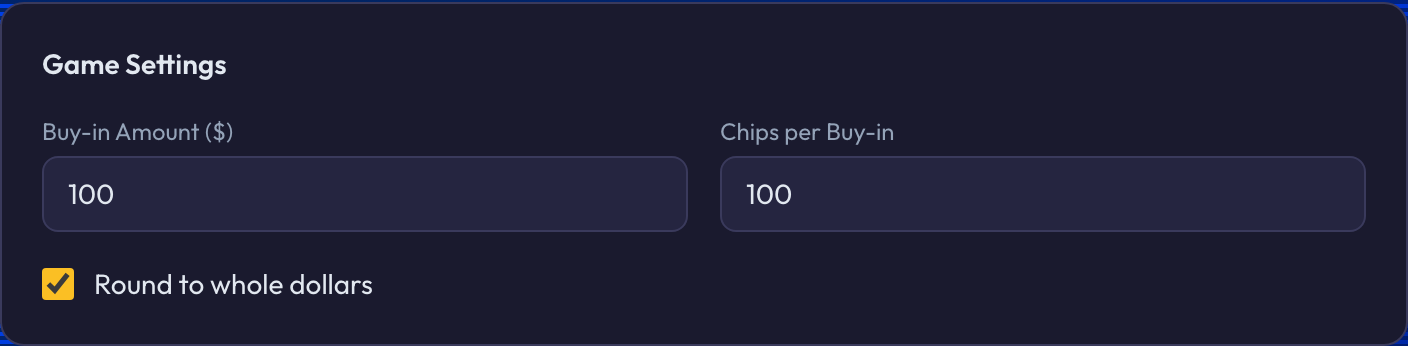
On the free calculator, the Game Settings panel has two boxes: Buy-in Amount ($) and Chips per Buy-in. Together they are your rate. A $100 buy-in for 100 chips is 1 chip = $1; a $100 buy-in for 10,000 chips is 1 chip = 1¢. Flip on Round to whole dollars if you don't settle in cents.
In the app, when you upload a session
The first time you load a game, PXF pops up a quick picker. 1 chip = $1 is pre-selected, so most people just hit save. Playing bigger? Pick Custom and type your buy-in and chip count (e.g. $50 buy-in for 10,000 chips). Tick "Use this for all my games" and PXF stops asking — it applies your rate automatically on every upload.

Change it any time after
Got it wrong, or a game played at a different stake? Every saved session has a Change rate control — set the new rate and your dashboard P/L recalculates on the spot. From your dashboard you can also switch between "Auto-applied on upload" and "Ask each time" whenever you like.

A few things to know
- ·The wrong rate is the #1 reason a total looks "off." If a payout is exactly 10× or 100× too big or too small, you almost certainly have the chip rate wrong — not a bug.
- ·Bigger games need Custom. "$50 for 10,000 chips" and similar deep-stack rates aren't a preset — pick Custom and type both numbers. PXF remembers it for next time.
- ·Each game keeps its own rate. If your crew plays $1 chips on Tuesday and a deeper game on Friday, set each session's rate once — your lifetime P/L stays correct across both.
- ·Rate only converts — it never invents chips. If a player's chip total is wrong, fix that against the ledger first (the Live Balance Check); the rate just turns correct chips into dollars.
Why we ask once, up front
We could try to guess your stakes — but a guess that's 100× off sends the wrong money to the wrong person. So PXF asks for the rate one time, pre-fills the answer most games use, and remembers it. Thirty seconds of setup, and every dollar figure after that is yours to trust.
Last updated June 30, 2026