Tour the hand replayer
Step through every hand you've ever played, action by action, on a real poker table. Here's what every button does.
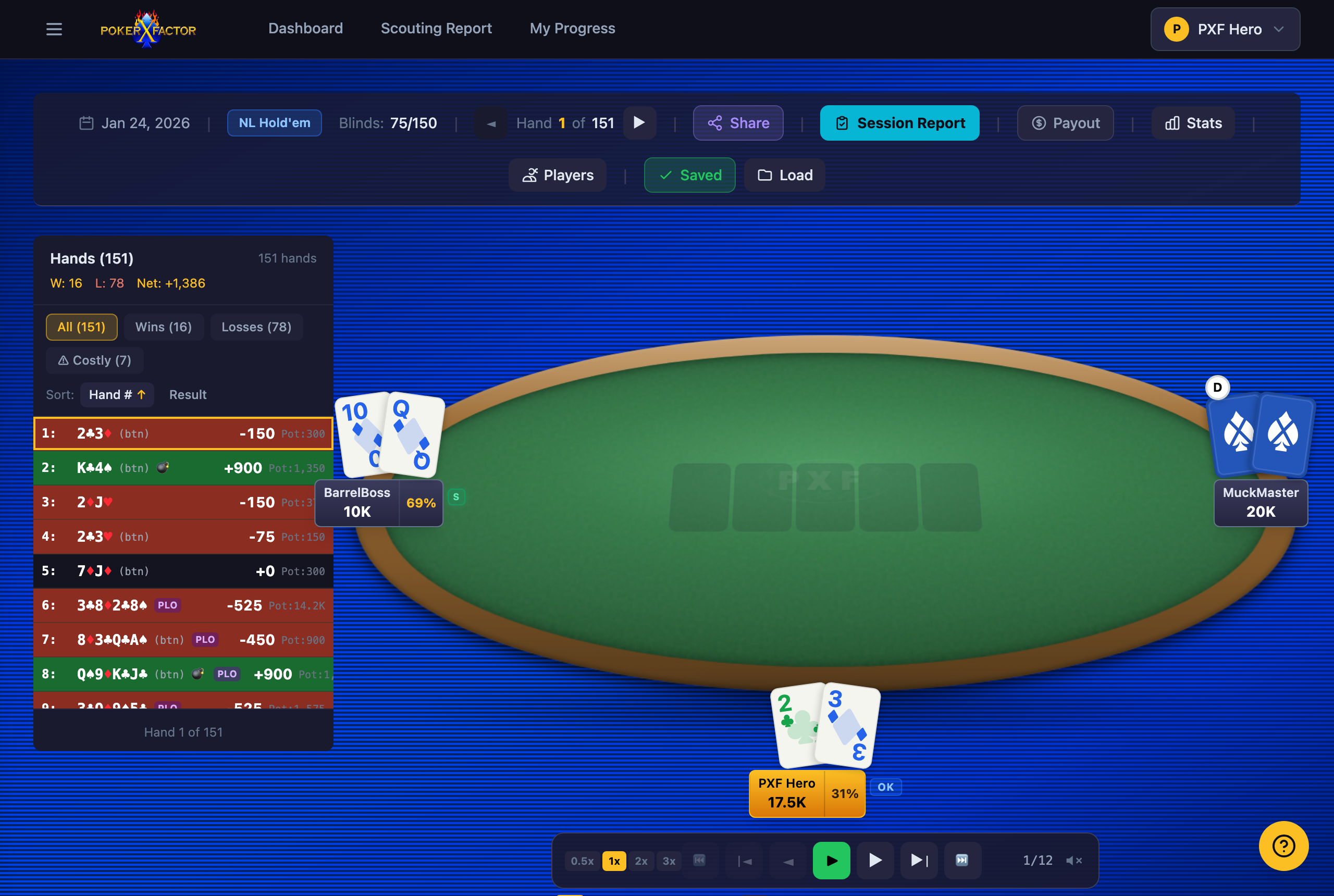
The action bar
Runs across the top of every session — six buttons, each opening a different tool for the game you're looking at.

Share
Copies a link to the hand you're viewing right now — anyone can open it, no account needed. Full guide: Share a hand.
Session Report
A summary of the whole session — how you played, where you lost the most, and your standout hands.
Payout
Settlement calculator for this game — who owes who, cross-checked against the PokerNow ledger.
Stats
Position, matchup, and hand-type breakdowns, with drill-downs into specific spots.
Players
Manage the roster for this session — rename aliases, merge duplicate handles, tag who's who.
Load
Jump to any other saved session without going back to the dashboard.
Playback controls
The bar below the table: speed pills (0.5x through 3x), start / step-back / play-pause / step-forward / end, and a hand counter (e.g. 1/12) showing where you are in the current hand's actions. Keyboard shortcuts work too — Space to play/pause, ←/→ to step, Home/End to jump to the start or end of the hand.
The hand-list sidebar
Every hand in the session, with your result on each one (green = won, red = lost). Filter to All, Wins, Losses, or Costly (your biggest losses), and sort by hand number or result. Click any hand to jump the table straight to it.
Last updated July 1, 2026